Autonomous
Autonomous ErgoChair Pro
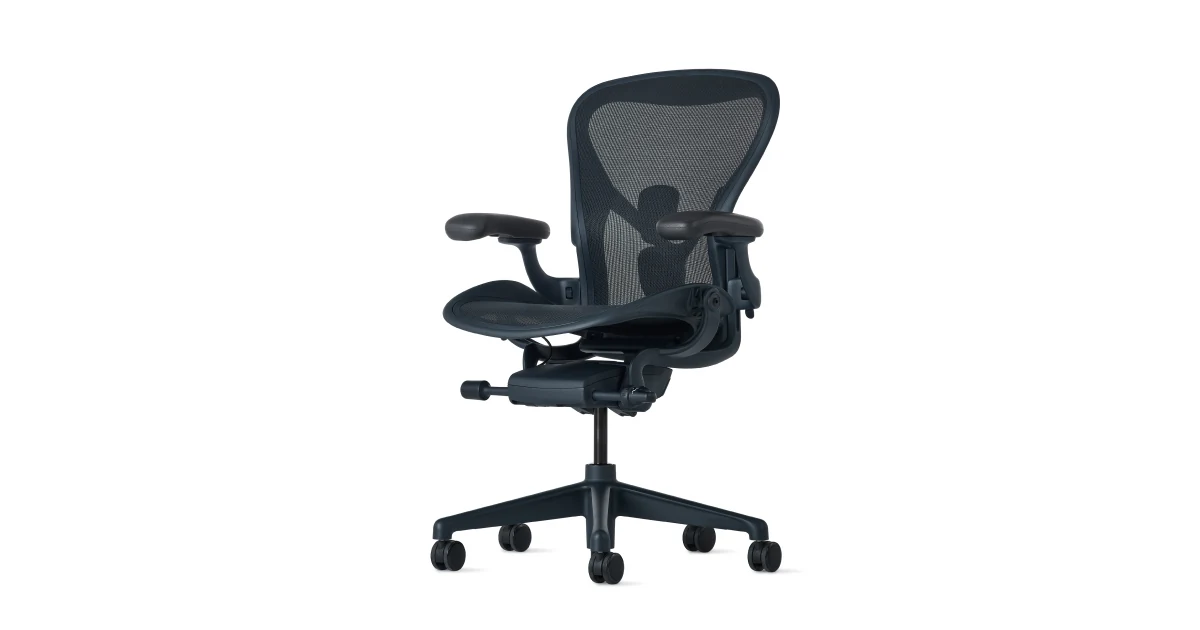
Full adjustability: lumbar, headrest, armrest, recline, seat depth. Mesh back.
Buy on Autonomous →Affiliate link — same price for you, supports Switcheroom.
Pros & Cons
What we like
- Great value
- fully adjustable
Watch out for
- Armrest padding wears over 2+ years
Renter-Safe Verified
This product can be used, installed, or placed without drilling, nailing, or permanently modifying your rental. When you move out, it comes with you — and your deposit stays intact.
A dining chair stops being a reasonable desk chair once work-from-home becomes a daily routine, but a four-figure office chair can be equally unrealistic. This adjustable mesh-back model occupies the middle: it gives a home-office user many ways to tune posture without entering flagship-chair pricing. The editorial verdict is positive for an owner willing to assemble and adjust it carefully. It is less convincing for someone who values polished mechanisms, rigid armrests, and a long premium warranty more than feature count.
Who It Is For—and Who Should Skip It
The ErgoChair Pro fits remote workers who want adjustable seat depth, arm position, headrest, lumbar support, and recline in one package. It also makes sense when two people occasionally share a workstation and need to reset the chair. Autonomous currently describes a breathable mesh back, flexible lumbar support, lockable recline positions, and fit up to 300 pounds. Skip it if you dislike assembling heavy furniture, need armrests that stay perfectly fixed when bumped, or want a mostly metal build. A buyer expecting premium fit-and-finish at this price will notice the plastic parts before noticing the adjustment list.
What Product Details and Buyer Feedback Reveal
Manufacturer information emphasizes the adjustable headrest, armrests, back tilt and tension, seat tilt, seat depth, and seat height. These controls are the product's strongest case because they let the user move the contact points instead of accepting a one-shape chair. The mesh back is intended to improve airflow, while the seat remains padded. Retail documentation confirms that assembly is required and lists a two-year warranty, which is materially shorter than the coverage attached to some premium office chairs.
Independent review patterns are consistent rather than uniformly glowing. PCMag praises the broad ergonomic customization and fair positioning relative to more expensive chairs, but flags difficult assembly, free-moving armrests, and extensive plastic as concerns. Other long-term reviews repeatedly mention armrest wobble or easy movement and lumbar or headrest adjustments that can take patience. Those are not proof that every unit will fail; they are decision signals for buyers who frequently lean on armrests or dislike mechanisms that need occasional readjustment.
Adjustment range is only useful when the controls match the user. A shorter person should confirm that feet can remain supported at a useful desk height, while a taller user should check seat depth and headrest position rather than relying on the stated capacity alone. If the desk is too high, the chair cannot solve the workstation by itself; a footrest or a different desk may be part of the real cost.
Renter and Apartment Fit
| Apartment factor | What to expect |
|---|---|
| Permanent damage | No wall or floor fastening; use a mat or suitable casters on vulnerable flooring. |
| Delivery | Assembly is required, so reserve clear floor space and keep packaging until fit is confirmed. |
| Shared workspace | Many adjustments help, but each user must learn and reset them. |
| Moving | The chair can move with the renter, although partial disassembly may be easier through tight access. |
Setup Reality and Common Failure Modes
Follow the current assembly guide and use the supplied hardware rather than improvising bolt positions. Building on cardboard or a rug helps protect both the chair and rental flooring. A second person is useful when aligning the back and seat even if the manual does not require one. After assembly, begin with feet flat and knees comfortable, then set seat depth so the front edge does not press behind the knees. Adjust lumbar support lightly, place the armrests under relaxed shoulders, and only then tune recline resistance and headrest position.
Common failures are tightening hardware unevenly, fitting the headrest before the basic seat position is correct, and assuming maximum lumbar pressure equals better support. Periodically check accessible fasteners if movement develops, following the manual rather than over-tightening. The central trade-off is refinement: this chair offers many controls for the money, yet premium alternatives tend to provide smoother, more stable mechanisms and longer coverage. Buyers who want fewer moving parts should compare a simpler fixed-back ergonomic chair; buyers who want a decade-scale warranty should compare authorized premium models before deciding on price alone.
Last checked: 2026-07-27. Research basis: Autonomous product page, official assembly support, PCMag independent review, and Newegg specifications and warranty listing.
Best For
- Apartment full-time remote office
- Renter upgrading from a dining chair
- Shared home workstation with multiple users
- Budget-conscious professional wanting broad adjustability
Setup & Install
Assembly is required; follow the current Autonomous guide and use the supplied hardware on a protected floor, with a second person helpful for aligning larger sections. No permanent mounting is involved. After assembly, set seat height and depth first, then lumbar, arms, recline, and headrest; use floor-compatible casters or a mat to limit rental-floor wear.
FAQ
What can be adjusted on the Autonomous ErgoChair Pro?
Manufacturer and retailer documentation list seat height and depth, armrests, headrest, lumbar support, back tilt angle and tension, recline positions, and seat tilt. Exact controls should be confirmed on the current configuration before purchase.
Does the ErgoChair Pro arrive assembled?
No. Retail and manufacturer support information show that assembly is required. Build it on a protected surface and follow the current guide rather than relying only on a third-party video.
What are the main complaints about the ErgoChair Pro?
Independent reviews repeatedly flag the involved assembly, armrests that can move or wobble, and a plastic-heavy feel. These are trade-offs to weigh against the broad adjustment range.
Is the ErgoChair Pro renter-friendly?
Yes in the sense that it needs no wall or floor fastening and can move to the next home. Protect delicate flooring, keep enough space for assembly, and check doorway clearance before a move.
How should I set up the lumbar support?
Start with gentle contact after seat height and depth are correct. More pressure is not automatically better; adjust until the back feels supported without being pushed forward.