CalDigit
CalDigit TS4 Thunderbolt 4 Dock
One cable to rule them all. 18 ports, 98W charging, 2.5GbE, 2x HDMI 2.0.
Buy on Amazon →Affiliate link — same price for you, supports Switcheroom.
Pros & Cons
What we like
- Clean desk setup
- massive port selection
Watch out for
- Expensive
- Thunderbolt-only
Renter-Safe Verified
This product can be used, installed, or placed without drilling, nailing, or permanently modifying your rental. When you move out, it comes with you — and your deposit stays intact.
A laptop can replace a desktop until the desk needs Ethernet, card readers, several USB devices, audio, charging, and external displays at the same time. The TS4 is a serious one-cable dock for that dense workstation, not an economical adapter for someone who only needs HDMI and two USB ports. Its value lies in consolidating many high-bandwidth connections and laptop power into a stable desk hub. The premium is easier to justify for a creator or technical professional who will use the port mix every day.
Who It Is For—and Who Should Skip It
It is best for Thunderbolt-equipped Mac, Windows, or Chrome users with fast storage, wired networking, SD and microSD media, audio gear, and a supported display setup. CalDigit specifies 18 ports, a 40Gb/s Thunderbolt connection, up to 98W host charging, 2.5Gb Ethernet, DisplayPort 1.4, and UHS-II card readers. Skip it if the laptop only has basic USB-C, if its charging demand exceeds the dock's host output, or if two display cables are the whole requirement. A cheaper USB-C hub is the more rational choice for light use.
What Product Details and Buyer Feedback Reveal
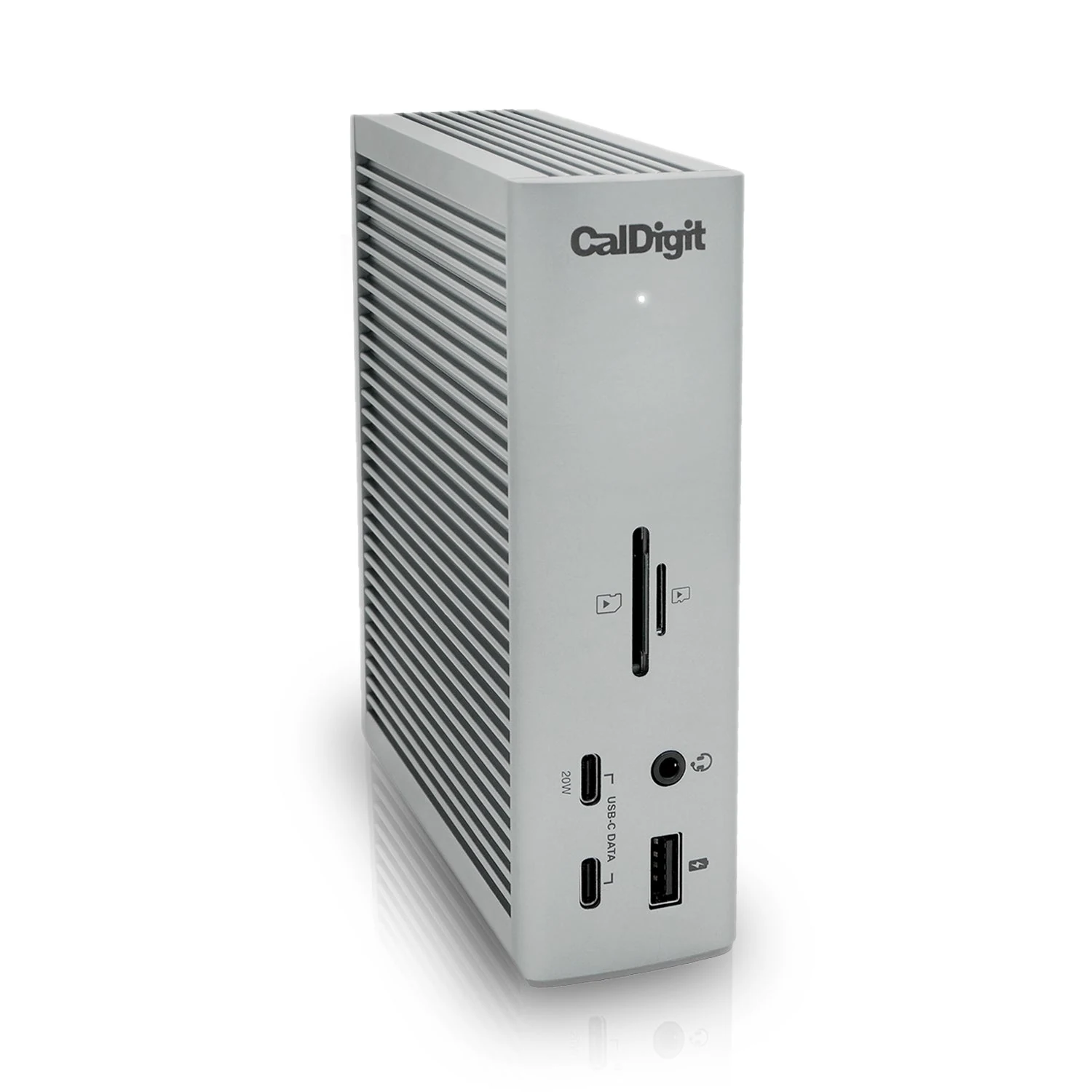
The official port inventory includes three downstream Thunderbolt 4 connections, USB-C and USB-A ports, wired networking, separate front and rear audio options, DisplayPort, and both full-size SD and microSD readers. It can stand vertically or lie horizontally. Not every port can deliver its headline maximum simultaneously: all traffic shares the host link, and CalDigit publishes a bandwidth-allocation diagram so users can place demanding storage and displays intelligently. The row's older summary incorrectly mentions two HDMI 2.0 ports; the exact TS4 uses DisplayPort 1.4 and Thunderbolt for video, so adapters may be required.
Retailer and owner feedback commonly praises the port density, solid enclosure, fast card and network options, and the convenience of returning to one laptop cable. The recurring caution concerns sleep and wake behavior with some combinations of Macs, displays, drives, adapters, operating systems, and older firmware. Reports include monitors failing to return at the expected mode or external storage disconnecting during sleep. These reports do not establish a universal fault, but they make CalDigit's support page, current firmware guidance, certified cables, and a tested return window important parts of the purchase.
Port placement deserves attention before purchase. Frequently swapped cards, headphones, and removable drives benefit from front access, while Ethernet, power, and persistent peripherals can remain at the rear. The TS4 has many connections, but it does not create unlimited PCIe bandwidth. A user copying large files while driving displays and networking should follow the official allocation guidance rather than assuming every device can sustain its individual maximum at once.
Renter and Apartment Fit
| Small-space issue | TS4 fit |
|---|---|
| Permanent installation | None; it rests vertically or horizontally on a desk. |
| Cable clutter | Moves connections to one hub, but the power supply and many peripheral cables still need routing. |
| Shared desk | Convenient only when both laptops support the required Thunderbolt or USB-C features. |
| Moving | Portable, though the dock, power supply, and certified host cable should stay together. |
Setup Reality and Common Failure Modes
Connect the CalDigit power supply, place the dock where ventilation is not blocked, and use the supplied or a certified Thunderbolt 4 host cable. Add one display and essential peripherals first, verify charging and network behavior, then add high-bandwidth storage and the remaining devices. On Windows, check that the specific USB-C or Thunderbolt port supports display output and charging; connector shape alone proves neither. On Apple silicon, external-display count depends on the exact Mac model, not just the dock.
If a display, Ethernet connection, or drive fails after sleep, update the operating system and follow CalDigit's model-specific support steps before swapping random cables. Do not disconnect mounted storage without ejecting it. The total cost may include a DisplayPort or Thunderbolt video adapter, longer certified cable, or separate high-power laptop charger. The honest trade-off is complexity: the TS4 replaces many adapters, but a heavily populated dock creates more compatibility variables. Buyers with a simple monitor-and-keyboard desk should skip the expense; buyers with repeatable professional I/O should map every port before ordering.
Last checked: 2026-07-27. Research basis: CalDigit TS4 product page, official bandwidth diagram, CalDigit support center, and exact-ASIN retailer listing.
Best For
- Apartment video editor with fast external storage
- Remote professional using wired Ethernet and one-cable charging
- Photographer importing SD and microSD cards
- Renter running a multi-peripheral laptop workstation
Setup & Install
No tools or mounting are required; connect the CalDigit power supply and use the supplied or another certified Thunderbolt 4 cable to the host. Verify laptop charging and one display before adding storage, networking, and the remaining peripherals. Keep ventilation clear and confirm the computer's exact external-display and USB-C/Thunderbolt capabilities, because the connector shape alone does not guarantee every feature.
FAQ
Does the CalDigit TS4 have HDMI ports?
No. The exact TS4 provides DisplayPort 1.4 and downstream Thunderbolt ports for video, not two built-in HDMI ports. An appropriate active adapter or cable may be needed for an HDMI display.
Can the TS4 charge every laptop at full speed?
It provides up to 98W to a supported host. A laptop that requires more may charge more slowly under load or may still need its own higher-power adapter.
Will the TS4 run two external monitors from any MacBook?
No. External-display support depends on the exact Mac chip and model as well as resolution, refresh rate, cables, and adapters. Check CalDigit's current compatibility guidance for the host before buying.
Why can a TS4 setup have sleep or wake problems?
Owner reports show that some combinations of operating system, firmware, display adapter, cable, storage, and host can behave poorly after sleep. Use certified cables, current official support guidance, and test the full setup during the return period.
Is the TS4 useful in a rental apartment?
It needs no installation and can reduce repeated laptop cabling on a compact desk. It does not eliminate the power brick or peripheral cables, so cable routing and a reachable outlet still matter.