Corsair
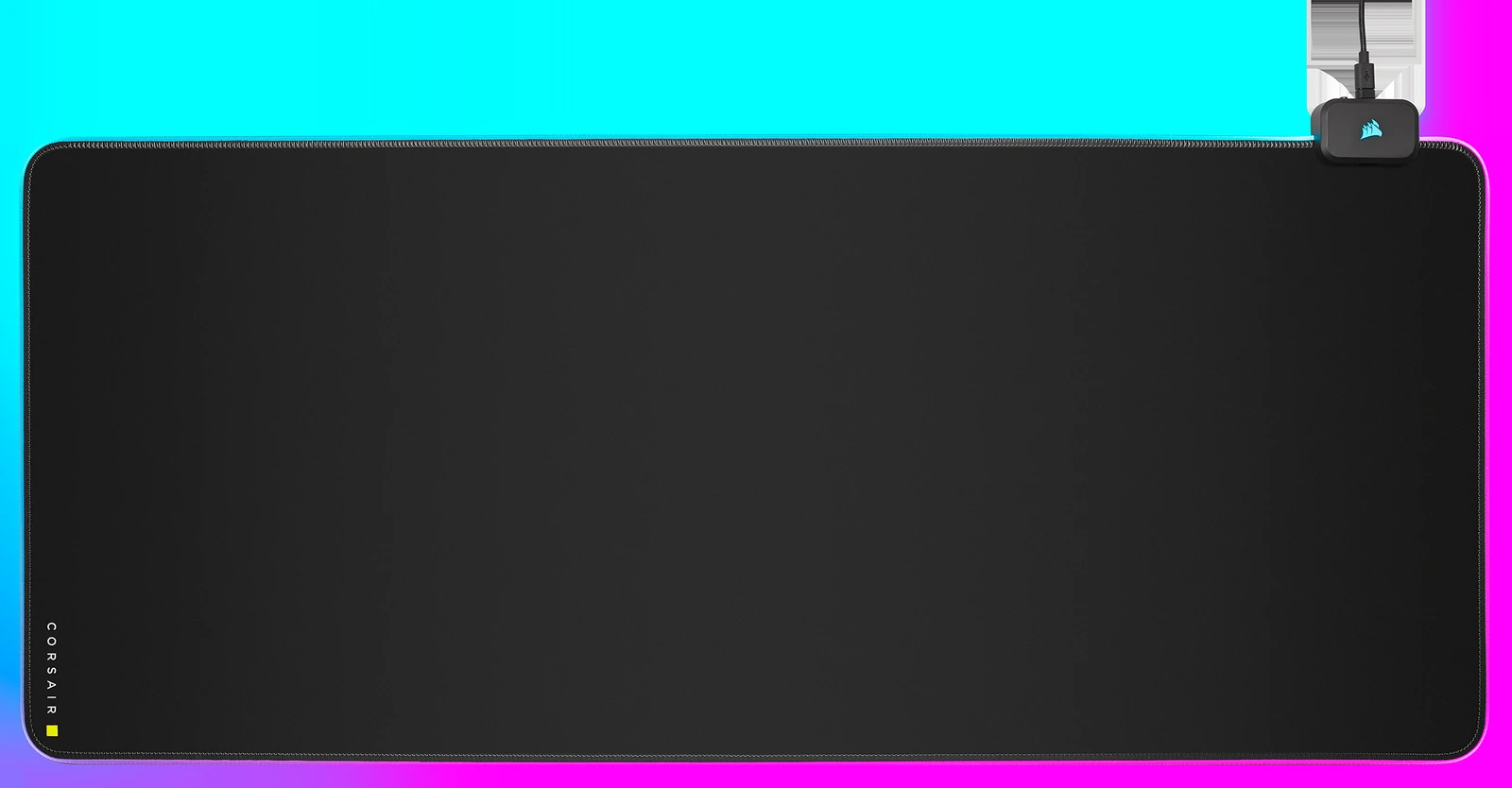
Corsair MM700 RGB Extended Cloth Gaming Mouse Pad (CH-9417070-WW)
A 36.6-by-15.8-inch, 4mm-thick black cloth desk mat with three-zone edge lighting, 12 onboard RGB profiles, two USB ports, and optional Corsair iCUE control.
Buy on Corsair →Affiliate link — same price for you, supports Switcheroom.
Pros & Cons
What we like
- Wide keyboard-and-mouse surface; thick rubber base; onboard lighting profiles; two convenient USB ports
Watch out for
- Needs a USB connection; harder to clean than a plain mat; control module occupies the rear-right edge
Renter-Safe Verified
This product can be used, installed, or placed without drilling, nailing, or permanently modifying your rental. When you move out, it comes with you — and your deposit stays intact.
A narrow mouse pad protects only the mouse lane; an extended mat gives the keyboard and mouse one stable surface while covering the part of a rental desk that collects scratches first. Corsair’s MM700 RGB Extended adds perimeter lighting and a small two-port USB hub to that basic job. The exact model is CH-9417070-WW, the 930-by-400mm version—not the much larger 3XL variant that appears beside it in search results.
Who It Is For—and Who Should Skip It
This is for a renter, gamer, or hybrid worker who wants a broad cloth surface, a non-slip base, and controllable desk lighting without attaching anything to furniture or walls. It also makes sense when two convenient USB ports near the keyboard can reduce cable reach. Skip it if the desk is shallower than 400mm, if drinks are a frequent hazard, or if a silent, cable-free workspace matters more than RGB. A plain washable desk mat costs less and is easier to maintain; the MM700 earns its premium only when the lighting and hub will actually be used.
What the Product Details and Buyer Feedback Reveal
Corsair specifies a 930-by-400mm cloth surface, 4mm rubber construction, 360-degree three-zone RGB lighting, 12 onboard lighting profiles, two USB ports, and optional customization through iCUE. The onboard profiles matter because basic lighting works without keeping software open. The control block sits at the rear-right edge and needs its USB power/data cable, so this is not a visually wireless accessory. The exact Amazon listing shows a strong 4.6-star rating during this check, and buyer commentary repeatedly values the size, smooth tracking, and lighting. The practical trade-offs are common to powered cloth mats: another cable on the desk, a raised module that dictates placement, and more careful cleaning than a simple slab of felt or leather.
Renter and Apartment Fit
- Lease impact: None. No adhesive, screws, or wall contact is required.
- Desk protection: The rubber-backed cloth surface separates keyboards, mice, and desk accessories from a landlord-provided desktop.
- Space check: Measure the usable desktop depth and allow clearance for the rear-right control module and cable.
- Move-out reality: Roll it gently with the cloth side outward, keep the controller from being crushed, and take it to the next desk.
Setup Reality and Common Failure Modes
Unroll the mat on a clean, dry desk and let it relax flat before placing heavy peripherals. Connect the included USB cable to enable the edge lighting and hub, then select an onboard profile with the hardware control or install iCUE for deeper synchronization. Avoid sharply folding the illuminated edge or resting a monitor arm on the perimeter tube. For cleaning, disconnect it first and follow Corsair’s care guidance; do not soak the control module or USB ports. If a keyboard cable or monitor stand conflicts with the rear-right block, reposition everything before committing to the desk layout.
Verdict
The MM700 is a rational replacement for a premium desk pad when the buyer wants both surface protection and a lit gaming setup at roughly the same price tier. The large cloth area and onboard modes provide value even without software, while the USB hub is useful only if its location suits the desk. Choose a plain mat if easy washing and zero cables are the priorities; choose this when the powered features solve real layout needs.
Last checked July 29, 2026. Sources: Corsair exact product page, Amazon exact model listing and buyer feedback, and Best Buy exact product listing.
Best For
- Apartment gaming desk needing surface protection
- Rental home office with keyboard and mouse on one mat
- Small streaming setup using synchronized RGB
- Shared desk needing two nearby USB ports
Setup & Install
No tools or mounting are required. Unroll it on a clean dry desktop, allow it to flatten, and connect the included USB cable for lighting and hub functions; keep liquids away from the control module and do not sharply fold the illuminated edge.
FAQ
How large is the Corsair MM700 RGB Extended mouse pad?
Corsair specifies 930 by 400mm, or about 36.6 by 15.8 inches, with 4mm-thick rubber construction. Measure desk depth and leave room for the rear-right control module.
Does the MM700 RGB need Corsair iCUE software?
No for basic use. The mat includes 12 onboard RGB profiles that can be selected without running iCUE; the software adds deeper customization and synchronization.
Does the Corsair MM700 include USB ports?
Yes. Corsair specifies two USB ports in the control module for nearby peripherals, but the mat must be connected by USB for powered features.
Is the MM700 safe for a rental desk?
Yes. It uses no adhesive or fasteners and its rubber-backed surface protects the desktop. Keep the desk clean and dry underneath and avoid trapping grit that could mark the finish.