Twelve South
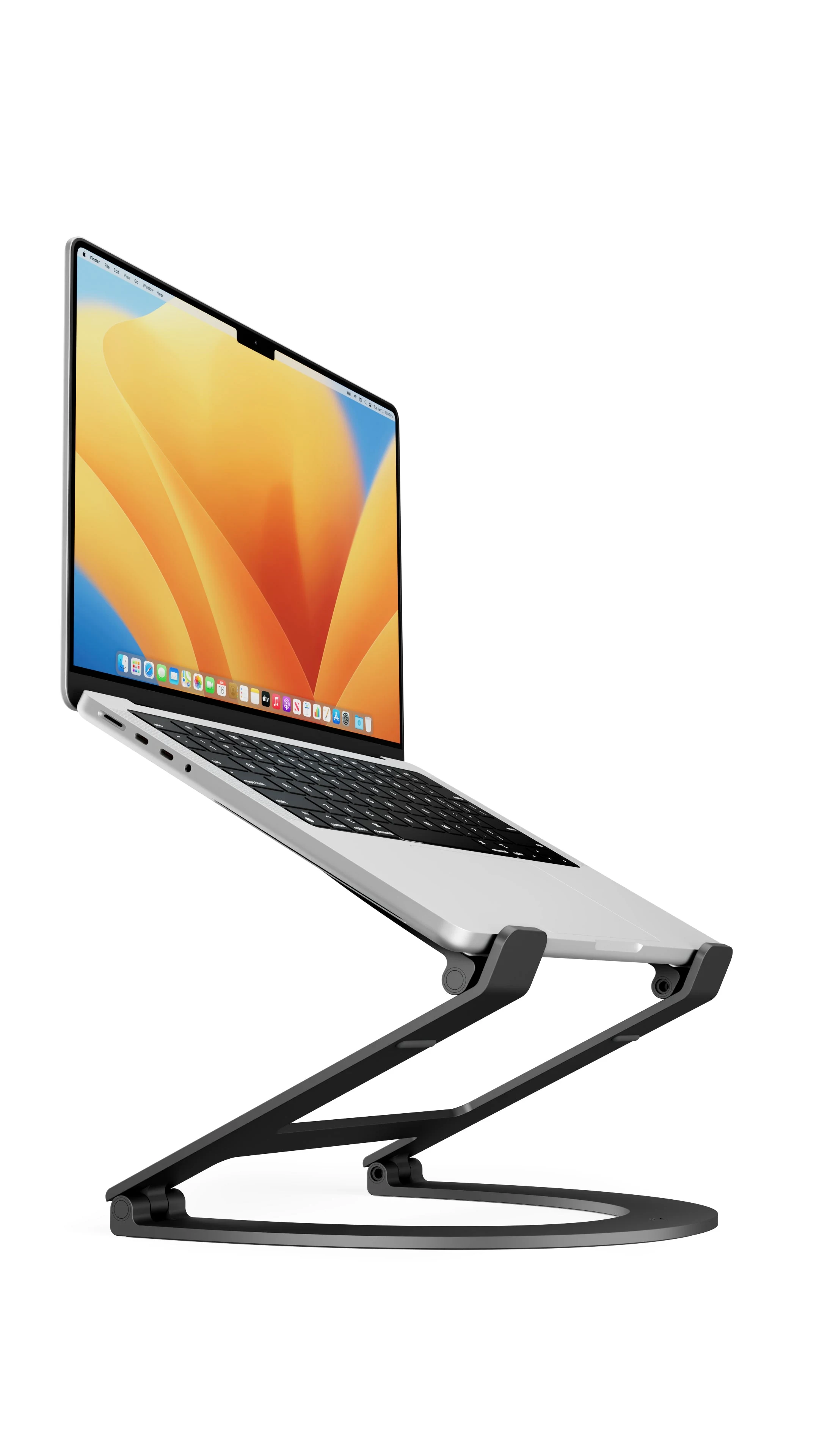
Twelve South Curve Flex Laptop Stand
Foldable aluminum laptop stand. Adjustable height. Fits 10-17" laptops. Travel-ready.
Buy on Amazon →Affiliate link — same price for you, supports Switcheroom.
Pros & Cons
What we like
- Foldable for travel
- adjustable height
- premium build
Watch out for
- Pricey for a stand
- wobbly at max height
Renter-Safe Verified
This product can be used, installed, or placed without drilling, nailing, or permanently modifying your rental. When you move out, it comes with you — and your deposit stays intact.
A laptop balanced on books solves screen height but creates a shaky desk and an awkward mess every time work moves to the dining table. Curve Flex is the premium answer for people who repeatedly switch locations yet still want the camera and screen closer to eye level. Its adjustable frame folds for travel instead of claiming a permanent patch of desk. Skip it if the laptop must remain usable as the primary keyboard at a high position, if a fixed stand would do, or if paying extra for finish and portability does not make sense.
Who It Is For—and Who Should Skip It
It fits remote workers, students, and frequent travelers who use an external keyboard and mouse for longer sessions. It also works as a lower desktop wedge when only a modest angle is needed. Twelve South markets the stand around MacBook, and the exact retailer listing identifies compatibility with laptops from 10 to 17 inches; owners of unusually thick, heavy, or nonstandard machines should still check the lip and support geometry rather than assuming a diagonal size guarantees a safe fit. People who want one-handed height changes should consider a less stiff design.
What Product Details and Buyer Feedback Reveal
Official facts: Twelve South says Curve Flex adjusts keyboard angle from zero to 45 degrees, can position the screen and camera up to 22 inches, folds flat, and includes a neoprene travel sleeve. A hex hinge tool stored with the sleeve can tighten the pivots if needed. The open aluminum structure uses contact pads where the laptop and stand meet.
Feedback pattern: Independent hands-on reviewers consistently value the range of positions, fold-flat portability, and ability to align a laptop with an external monitor. The same reviews repeatedly note a real consequence of that stability: the hinges can feel stiff when changing height or angle. That is preferable to a hinge that slowly collapses, but it makes frequent adjustment less effortless. Reviewers also reinforce that the highest ergonomic positions assume a separate keyboard and pointing device.
Renter and Apartment Fit
| Use condition | Fit |
|---|---|
| Lease impact | No drilling, adhesive, or furniture attachment. |
| Small desk | Raises the computer and leaves some usable area beneath, but its base still needs a stable footprint. |
| Shared table | Folds away when the dining surface returns to household use. |
| Mobile work | The included sleeve protects the folded stand, though it adds more weight and bulk than a minimal fixed riser. |
There is almost no deposit risk because the product does not touch walls. The practical risk is to the laptop or tabletop: keep grit away from the pads, verify all feet are planted, and do not place the raised setup where a cable can be pulled by a passerby.
Setup Reality and Common Failure Modes
No assembly is normally required. Unfold the base on a flat desk, adjust the three pivot areas with two hands, confirm that the frame is stable, and then place the laptop squarely on its supports. Use the supplied hex tool only if hinge tension needs correction, following Twelve South guidance rather than loosening the joints casually. At high settings, connect an external keyboard and mouse instead of pressing heavily on the raised laptop.
The common failure modes are poor balance on a soft or uneven surface, a laptop that is not seated against both lower supports, cable pull, and hinge tension that is either frustratingly firm or no longer firm enough. The honest trade-off is price and adjustment effort. A fixed aluminum riser is the better value for one permanent desk; Curve Flex earns its premium when changing height, folding flat, and moving between rooms are frequent needs.
Last checked: 2026-07-27. Sources: Twelve South product and support details, exact retailer listing, and ChannelLife hands-on review.Best For
- Renter home office with a compact desk
- Remote worker moving between bedroom and dining table
- Student using an external keyboard in a dorm
- Frequent traveler building a temporary workstation
Setup & Install
No mounting or assembly is normally required; unfold it on a flat, rigid surface, set the pivot angles with two hands, and seat the laptop evenly on both supports. The included hex tool is for correcting hinge tension if needed. It leaves no holes or adhesive residue, but high positions should be used with an external keyboard and with cables routed so they cannot pull the stand.
FAQ
Does Twelve South Curve Flex require assembly?
No routine assembly is required. Unfold it, adjust the pivot points, verify that the base is stable, and place the laptop evenly on the supports. A hex tool is included for hinge-tension adjustment if that becomes necessary.
Can Curve Flex be used in a rental apartment?
Yes. It is a freestanding desktop accessory with no screws, clamps, or adhesive, so it does not alter walls or furniture. Use it on a flat, rigid surface and protect the desk from trapped grit.
Do I need an external keyboard with Curve Flex?
At a low wedge angle, the laptop keyboard can remain practical. At higher screen positions, an external keyboard and mouse are the safer and more ergonomic choice because typing directly on the raised laptop adds movement and downward force.
Why are the Curve Flex hinges stiff?
Firm pivots help the stand hold its selected position. Hands-on reviews note that adjustment can take effort; use two hands and consult the manufacturer instructions before changing tension with the included tool.